Best AI Presentation Tools for Lawyers in 2026


Lawyers don't get paid to make slides. Yet turning a brief into a client deck, a deal summary into a pitch, or a ruling into a CLE session eats hours that never reach an invoice — and those hours are not scarce by accident. According to Clio's Legal Trends Report, the average lawyer's utilization rate sits around 37%, roughly three billable hours in an eight-hour day; most of the rest goes to administrative work. Slide-building lives squarely in that non-billable bucket.
That is why AI presentation tools have moved from novelty to line item. Adoption of AI among lawyers jumped from 11% in 2023 to 30% in 2024, according to the American Bar Association's 2024 Legal Technology Survey Report, and it scales sharply with firm size.
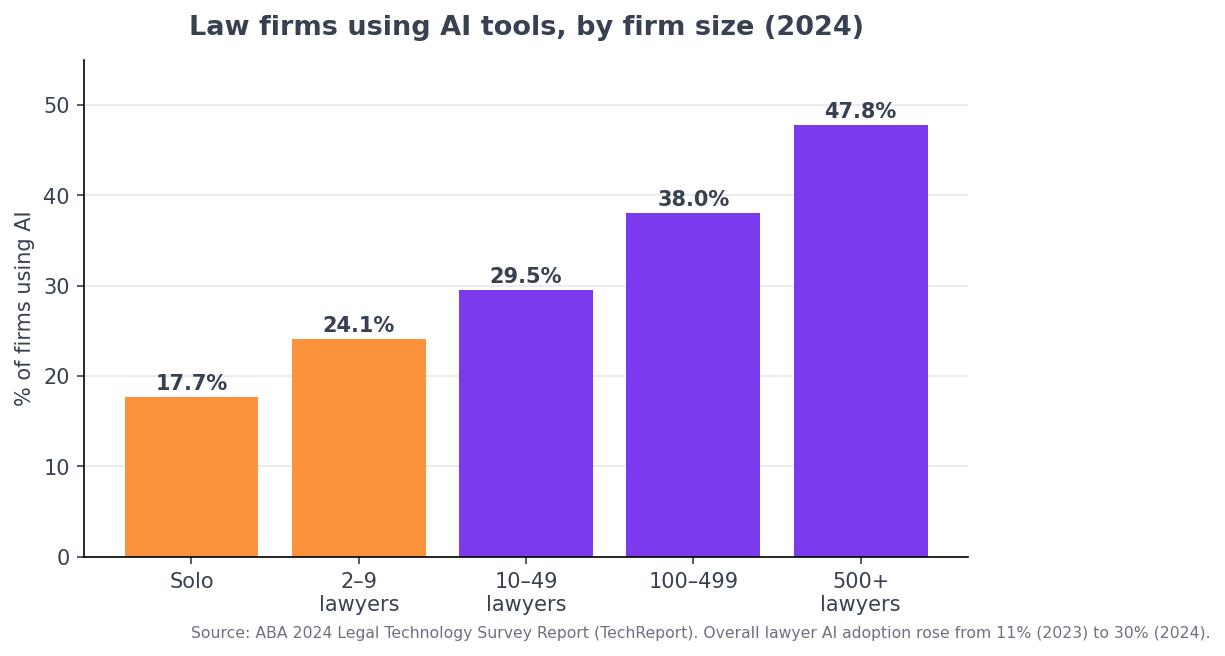
But "AI for lawyers" and "AI that builds your slides" are not the same market, and most "best legal AI" roundups blur them. Below is an honest comparison of the tools that actually generate presentations, what separates them for legal work, and where each one genuinely wins.
Legal AI vs. AI slide makers: an important distinction
The tools that dominate legal-AI headlines — Harvey, Thomson Reuters CoCounsel, Spellbook, Lexis+ AI, Clio Duo — do legal work: research, contract review, drafting, practice management. None of them produce a finished slide deck. They are excellent at what they do, but if your goal is a deck, they hand off nothing slide-ready.
The tools below are the ones that actually build the presentation. They fall into three groups: dedicated AI deck generators (ChatSlide, 2Slides, Gamma, Beautiful.ai), AI built into the office suite you already license (Microsoft 365 Copilot, Google Gemini in Slides, Plus AI), and — a cautionary note — discontinued products. (Tome, once a popular AI deck tool, shut down its presentation product in 2025; don't build a workflow on it.)
What actually matters for legal work
Three criteria separate a tool that fits a law practice from one that doesn't:
1. Confidentiality and the training question. This is the one most buyers miss. Under ABA Formal Opinion 512 (July 2024) — the ABA's first ethics guidance on generative AI — a lawyer must understand how a tool uses input data, and feeding client information into a tool that trains on its inputs "by its very nature" risks improper disclosure under Model Rule 1.6. The opinion says client informed consent is required before inputting representation-related information into such a tool, and that consent can't be buried boilerplate. Translation: a tool's default training policy is a compliance fact, not a footnote. (Gamma, for example, uses Free and Individual-plan content to improve its AI by default, with training only locked off on Team and Business workspaces.)
2. Real document handling. Lawyers work in PDFs, including scanned filings. A tool that only restyles text you paste is far less useful than one that can OCR a scanned brief and extract the facts, holdings, and clauses.
3. Trustworthy charts. For damages models or deal financials, a chart invented by an image model is a liability. The tool should build visualizations from data you actually supply.
The best AI presentation tools for lawyers in 2026
| Tool | Category | Reads PDFs / OCR | Trains on your uploads? | Charts from your data | Export | Published price (2026)* |
|---|---|---|---|---|---|---|
| ChatSlide | Dedicated, legal-positioned | ✅ (incl. OCR) | States no (per its legal page) | ✅ | PPTX, PDF, Keynote | Free tier; paid from a few $/mo |
| 2Slides | Dedicated, legal-marketed | ✅ | Not clearly stated | ⚠️ | PPTX, MP4 | Pro ~$12.50/mo |
| Gamma | Dedicated, design-led | ⚠️ (text-first) | ⚠️ Yes on Free/Individual by default | ⚠️ | PPTX, PDF | Free; Plus ~$12/mo; Team ~$20/seat |
| Beautiful.ai | Dedicated, design-led | ❌ | Per enterprise terms | ⚠️ | PPTX, PDF | Team ~$40/user/mo |
| Microsoft 365 Copilot | In PowerPoint | ⚠️ | No (enterprise data protection) | ⚠️ | Native PPTX | $18–$30/user add-on |
| Google Gemini (Slides) | In Google Slides | ⚠️ | No (Workspace terms) | ⚠️ | Native Slides | Bundled in Workspace (~$14/user) |
| Plus AI | Add-in for PowerPoint/Slides | ⚠️ | Per terms | ⚠️ | Native PPTX/Slides | Basic ~$10/mo |
*Published vendor pricing as of 2026; tiers and promos rotate — confirm on each vendor's page. "Trains on your uploads" reflects each vendor's stated default; verify against current terms before uploading client material.
Best for turning legal documents into decks: ChatSlide
If the job is "take this brief, memo, contract, or discovery PDF and make a deck," ChatSlide's AI presentation tool built for legal documents is the most legal-aware option. It ingests PDFs and Word files — including scanned filings via OCR — and extracts the structure into an editable deck, builds charts from data you supply rather than inventing them, and exports to PowerPoint, PDF, and Keynote. On confidentiality, its legal page states uploads are processed without being used to train models — the policy Opinion 512 tells you to check for. A free tier lets a firm test it before committing. It won't out-design a dedicated design tool, but for document-to-deck legal work it's the strongest fit.
Most popular standalone: Gamma
Gamma is the most-used standalone AI deck generator, and deservedly — it produces attractive, on-brand decks fast. The catch for lawyers is the training default: on Free and Individual plans, your content is used to improve Gamma's AI unless you opt out; training is only excluded on Team and Business workspaces. For client work, that means a paid team workspace is effectively mandatory, not optional.
If you live in Microsoft or Google: Copilot, Gemini, Plus AI
Firms standardized on Microsoft 365 or Google Workspace can generate slides inside the tools they already license — Microsoft 365 Copilot and Google Gemini in Slides both draft and edit decks natively, under the enterprise data-protection terms a firm has likely already vetted. Plus AI adds similar generation as an add-in inside PowerPoint and Google Slides. These are generalists — weaker at reading a scanned brief or producing litigation-grade charts than a purpose-built tool — but the procurement and data-governance story is simpler because it's already in place.
Design-led: Beautiful.ai and Pitch
Beautiful.ai (template-driven smart slides, strong brand controls) and Pitch (collaborative, polished) are excellent for marketing decks and internal updates. They're less specialized for dense legal source documents and aren't built around the confidentiality workflows a privileged matter needs — review their data terms before uploading anything client-related.
How to choose
- Most of your decks start from a document (brief, memo, contract)? Prioritize OCR + extraction → a dedicated, document-aware tool.
- Handling privileged client material? Make the training policy a hard requirement, per Opinion 512, and upload redacted or de-identified material where possible.
- Already all-in on Microsoft or Google? Start with Copilot/Gemini — the data governance is already settled.
- Mostly polished marketing or pitch decks? A design-led tool may serve you better than a document-extraction one.
Whatever you pick, the duty of competence (Model Rule 1.1, Comment [8]) cuts both ways: an attorney should review every AI-drafted deck for accuracy and privilege before it leaves the firm — and, increasingly, should not ignore efficiencies that have become standard practice.
Frequently asked questions
What is the best AI presentation tool for lawyers? For turning legal documents into slides, a dedicated, document-aware tool like ChatSlide fits best because it handles PDFs and scanned filings and states it doesn't train on your uploads. If you're standardized on Microsoft or Google, Copilot or Gemini may win on data governance. There's no single answer — match the tool to your source material and confidentiality needs.
Is it safe to use AI slide tools for confidential legal documents? It can be, but per ABA Formal Opinion 512 you must understand how the tool uses your data, get client informed consent before inputting representation-related information into a tool that trains on inputs, and prefer tools that don't train on uploads. Upload redacted material for the most sensitive matters and review output for privilege.
Can AI build a slide deck from a case brief? Yes — dedicated tools with OCR and document extraction (e.g., ChatSlide) can read a brief or scanned filing and produce a structured first-draft deck. General tools can draft slide content from text you paste but are weaker at reading source documents directly.
Do Harvey or CoCounsel make presentations? No. Harvey and CoCounsel are legal research, drafting, and review platforms — they don't generate slide decks. For presentations you need a dedicated slide tool or the AI inside PowerPoint/Google Slides.
Sources
- American Bar Association, 2024 Legal Technology Survey Report (TechReport) — AI adoption figures and firm-size breakdown.
- Clio, Legal Trends Report — lawyer utilization and non-billable time.
- ABA, Formal Opinion 512: Generative Artificial Intelligence Tools (July 2024) and Model Rule 1.1, Comment [8] — confidentiality, informed consent, and technology competence.
- Vendor pricing and data-training policies from each provider's published pricing and privacy pages (2026); figures rotate — verify before relying on them.